
Durable workflows with Temporal and AI
I’ve been using Temporal for a while, both for proofs of concept and in production. The Temporal AI Agent demo got me thinking about a different question: what if AI helped with one step in a business process instead of driving the whole thing?
For my demo, I picked an RSS feed I like. The workflow reads the feed and uses AI to predict which links I’ll find interesting. I can accept or reject each article and separately rate the AI’s recommendation.
I’m running Ollama locally to keep costs down. It might not be the fastest or give the best predictions, but that’s not what I’m trying to show. I’m more interested in how AI and user input fit into a durable workflow.
The RSS feed is just a small example. The same pattern can help with customer workflows: use AI to make a suggestion, wait for a person to weigh in, and pick up where you left off even if the system was restarted in the meantime.
What happens to one link?
The workflow starts by reading the full RSS feed as XML. Once it has the feed, it processes each post separately. Temporal workers handle those requests and call my local Ollama server to predict how interesting I’ll find each link.
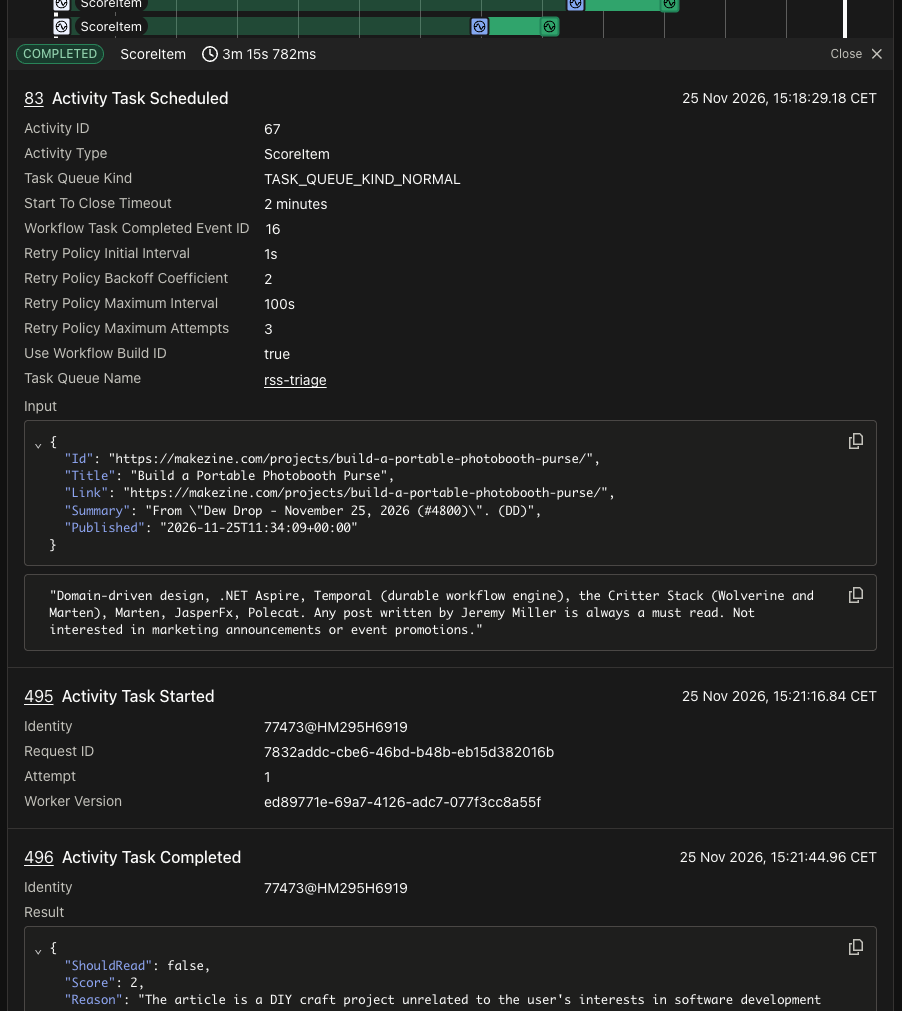
Figure 1: The AI’s prediction for a link from the RSS feed.
Ollama gave “Build a Portable Photobooth Purse” a 2 out of 10 because it didn’t match my interest in software development.
Once the articles have been processed, they show up in an inbox on my website. I can accept an article to move it to my “Saved articles” list, or I can reject it. Separately, I can rate the AI’s recommendation and add a note explaining my rating. I could use that feedback later to teach my models what I’m interested in and improve their predictions.
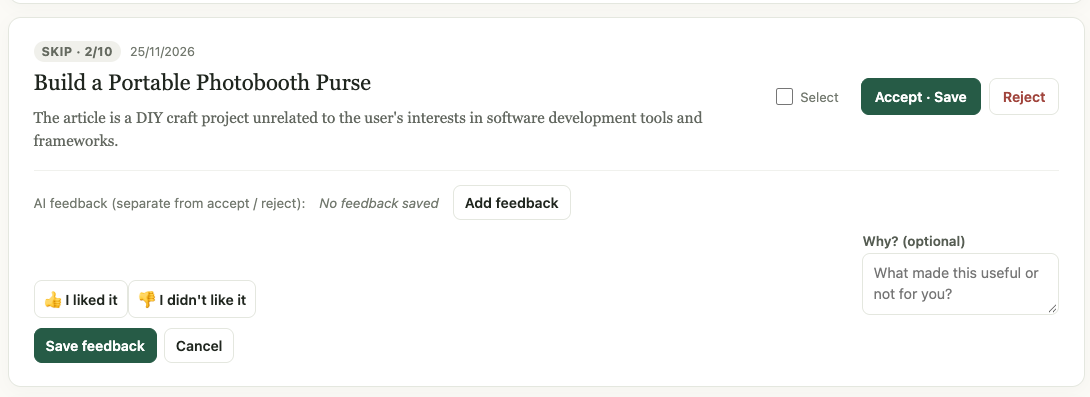
Figure 2: The inbox has separate controls for accepting or rejecting an article and rating the AI’s recommendation. No feedback has been saved yet.
What makes this workflow durable?
What happens if I restart the worker after Temporal records that 2 out of 10, but before I decide what to do with the article? From my point of view, not much. The article is still in my inbox, and I can still accept or reject it.
Temporal keeps an event history for the workflow. When a worker needs to rebuild the workflow’s state, it replays the workflow code against that history. That’s why a Temporal workflow has to be deterministic: given the same recorded history, the workflow makes the same decisions. In this case, replay uses the recorded prediction instead of asking Ollama again and brings the workflow back to the point where it was waiting for me.
What’s a workflow, and what’s an activity?
The workflow describes what should happen and in what order. For one article, that means getting a prediction, waiting for my decision, and then doing something with that decision.
An activity does a specific piece of work. Fetching the RSS feed and calling Ollama are good examples. Activities don’t have to be deterministic: if I ask Ollama about the same article twice, I might get two different answers. If Ollama is temporarily unavailable, Temporal can retry the activity.
Waiting for me is different: that’s part of the workflow, not an activity that needs a worker to stay running. When I accept or reject the article on the website, that decision is sent to the workflow so it can continue.
And whatever Ollama says, the workflow still waits for my decision. That doesn’t stop the model from making things up, but it gives me a chance to catch a bad answer before the workflow acts on it.
How could this be used for business workflows?
Say an invoice comes in for 100 items, but the delivery record only shows 60. AI flags the quantity mismatch and suggests that it might be a partial delivery. The workflow sends it to Finance for review and waits overnight. No worker needs to stay running while everyone’s gone.
The next morning, someone in Finance checks the delivery record and confirms that only 60 items arrived. They decide the supplier needs to correct the invoice. The workflow picks up where it left off and routes the invoice back to the supplier instead of sending it for payment. The AI pointed out what to look at, but Finance made the call.
The same pattern could help in other places:
- Customer support: AI could draft a reply to a customer. A support agent can edit or approve it before the workflow sends anything.
- Customer onboarding: AI could check the documents a customer submitted against a checklist and flag anything that looks missing. An onboarding specialist can check those flags before the workflow asks the customer to send anything else.
Closing
I don’t really need all of this to decide whether to read an article. But it’s a small example of something I do want in a business process: AI can make a suggestion, a person can make the decision, and the workflow can wait until they’re ready.
If you want to see how I put it together, the full demo code is on GitHub.